

Ultimate Step-by-Step Guide to Building a Custom Web Application for Beginners
Imagine you own a business that has specific operational needs—connecting smoothly with customers, streamlining internal processes, or processing automated orders. A tool designed to handle those exact workflows is precisely what a custom web application provides. Instead of adjusting your operations to fit into rigid, off-the-shelf software, custom web application development delivers an architecture built around your exact commercial goals. Below is a foundational overview of web application architecture and a practical, step-by-step development roadmap.
What is Web Application Development?
In simple terms, a web application is dynamic software accessed through an internet browser without requiring local machine installations. Web applications run on remote servers, making them accessible across any operating system or device with network connectivity. Familiar examples include browser-based productivity tools like Gmail and Google Docs.
Developing a custom solution takes this a step further: it eliminates unnecessary third-party software bloat and builds proprietary tools, integrations, and database relations designed strictly for your business logic.
Why Invest in Custom Web Application Development?
While SaaS and off-the-shelf platforms offer quick deployment, custom web applications provide strategic technical and business advantages:
- Tailored to Your Needs: Built directly around proprietary workflows, reducing manual workarounds and licensing overhead.
- Scalable Architecture: Architected to expand seamlessly—allowing horizontal and vertical scaling as transaction volumes grow.
- Targeted User Experience (UX): Interfaces are optimized specifically for your team or customer journey, maximizing task completion rates.
- Enhanced Security: Custom codebases avoid common generic CMS vulnerabilities and implement zero-trust access controls suited to your compliance standards.
- Seamless Integration: Direct API connections with existing ERPs, CRMs, legacy databases, and payment processors.
- Long-Term Cost Efficiency: Eliminates recurring per-seat user subscription fees and expensive vendor lock-in.
- Dedicated Maintenance & Control: Full codebase ownership allows prioritized feature releases and swift security patching.
Steps to Building a Custom Web Application
Developing an enterprise-ready web application requires systematic planning and execution. Reviewing custom application development challenges and solutions will help you prepare for technical hurdles at every phase of the project lifecycle.
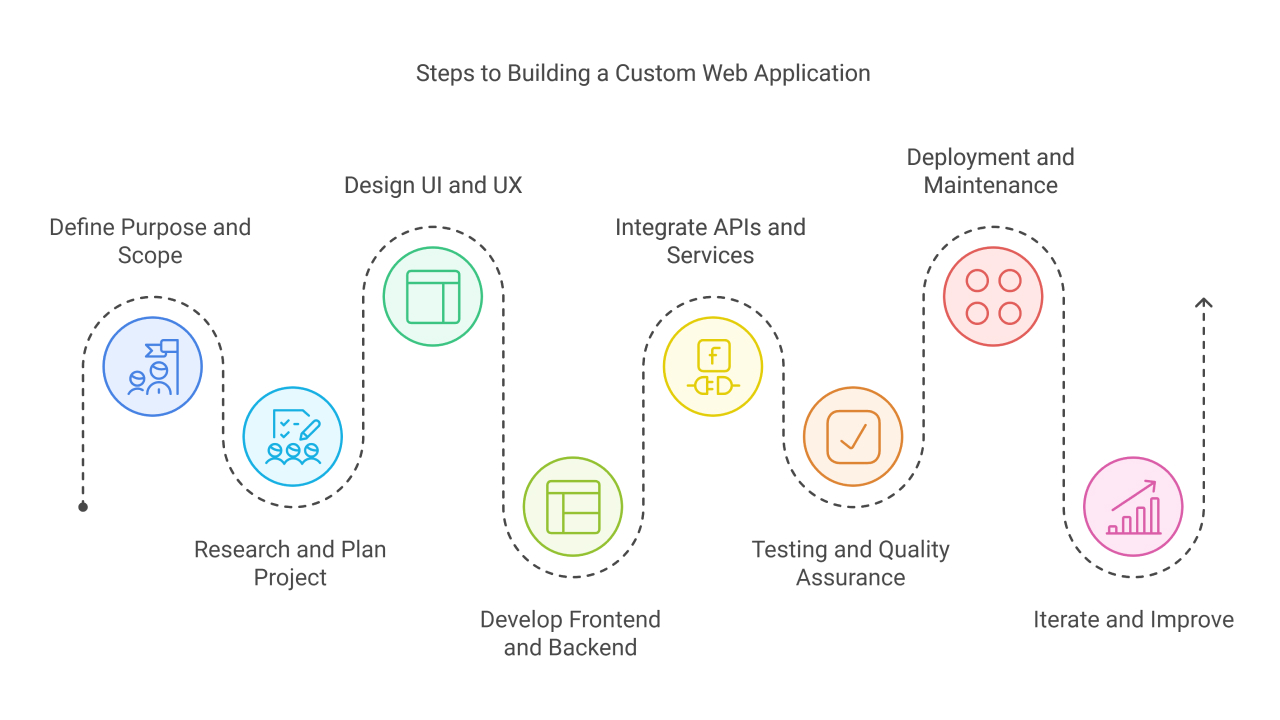
1. Define Your Purpose and Scope
Every software project must establish clear technical parameters before writing any code. Clarify these three fundamentals:
- What specific operational bottleneck or customer need does the application solve?
- Who are the core personas (e.g., end-users, system administrators, external vendors)?
- What is the Minimum Viable Product (MVP) feature set versus secondary releases?
Example: For a boutique hotel, an MVP should prioritize live room availability, integrated checkout, and automated booking confirmations. Advanced amenities booking or virtual tours can be reserved for subsequent iterations.
Establish a documented budget, defined milestone deliverables, and a timeline buffer to absorb scope shifts during development.
2. Research and Plan Your Project
Competitive Analysis: Inspect existing market solutions to identify structural gaps, confusing user flows, and pricing tiers you can improve upon.
Choosing the Right Tech Stack: Your technical stack directly impacts system throughput, security, and future developer hiring. A dependable web architecture includes:
- Frontend (Client-Side): HTML5, CSS3, JavaScript/TypeScript paired with component frameworks such as React, Vue.js, or Angular.
- Backend (Server-Side): Node.js, Python (Django/FastAPI), PHP (Laravel), Java (Spring Boot), or C# (.NET Core) handling API business logic.
- Database: Relational systems (PostgreSQL, MySQL) for transactional relational data, or NoSQL databases (MongoDB, DynamoDB) for document-based, flexible schemas.
System Blueprints: Produce low-fidelity wireframes and database Entity Relationship Diagrams (ERDs) to map data structures prior to implementation.
3. Design the User Interface (UI) and User Experience (UX)
Effective UI/UX design balances visual simplicity with functional speed. Users should accomplish primary tasks—such as booking an appointment or filtering inventory—with minimal friction.
Interactive Prototypes: Use design tools like Figma to create clickable prototypes. Testing interactive mockups with key stakeholders helps surface layout confusion and navigation bottlenecks before developers begin coding frontend components.
4. Develop the Frontend and Backend
Frontend Development: Developers convert approved wireframes into responsive, standards-compliant web components ensuring cross-browser compatibility and accessible interfaces.
Backend Architecture: The backend powers data persistence, user authorization, and internal processing rules:
- Database Management: Establishing indexes, relational integrity, migrations, and caching mechanisms (e.g., Redis).
- API Architecture: Designing standardized RESTful endpoints or GraphQL schemas for responsive data exchange.
- Authentication & Security: Enforcing industry standards like OAuth2, JSON Web Tokens (JWT), role-based access control (RBAC), and encryption protocols.
5. Integrate APIs and Third-Party Services
Third-party APIs accelerate development without sacrificing reliability. Connect production-grade services for specialized operations, such as:
- Payment Processing: Stripe, Razorpay, or PayPal for secure, PCI-compliant transactions.
- Communications: Twilio for SMS notifications, SendGrid or Amazon SES for automated transactional emails.
- Storage & CDNs: Cloud storage like AWS S3 integrated with Cloudflare for asset caching.
6. Testing and Quality Assurance (QA)
Rigorous QA pipelines ensure business stability and prevent production downtime:
- Functional Testing: Verifying individual modules, calculations, workflows, and form submissions.
- Performance Testing: Benchmarking load handling, database response latency, and Core Web Vitals under simulated traffic spikes.
- Usability Testing: Evaluating user flow completion times and layout responsiveness on multiple screen sizes.
- Security Testing: Performing penetration testing to prevent SQL injection, Cross-Site Scripting (XSS), and Cross-Site Request Forgery (CSRF).
7. Deployment and Maintenance
Prepare production releases using Continuous Integration and Continuous Deployment (CI/CD) pipelines (e.g., GitHub Actions, GitLab CI). This ensures automated testing and code linting before production deployment.
Deploy to managed cloud platforms like AWS, Microsoft Azure, or Google Cloud Platform. Set up active uptime monitoring and error tracking with tools like Sentry, Datadog, or New Relic to catch unexpected server-side exceptions immediately.
8. Iterate and Improve
Web applications are living software products. Analyze real-world telemetry, query times, and user heatmaps to schedule iterative releases. Continuous optimization keeps your application secure, fast, and aligned with changing market requirements.
How Revalsys Custom Web Applications Benefit Businesses
Navigating software architecture requires deep engineering expertise. Revalsys Technologies specializes in enterprise web application development built to your exact operational specifications:
- Tailored Architecture: Engineered around your business rules and security requirements for reliable scalability.
- High-Performance Data Handling: Built for low-latency transaction processing and real-time operational analytics.
- Enterprise Systems Integration: Clean API integrations bridging new software with your legacy ERPs and internal tooling.
- Security-First Engineering: Strict data encryption, identity access management, and automated security safeguards.
- Long-Term Scalability: Ready to handle higher request loads without costly system rebuilds; read our guide on overcoming web application scalability challenges.
Conclusion
Building a custom web application transforms organizational efficiency and provides a scalable digital foundation for your business. By methodically progressing through discovery, architectural planning, UI/UX prototyping, backend development, and QA testing, you create high-performing proprietary software that gives your brand a clear competitive edge. If you are preparing to build a reliable, custom web solution, consult with Revalsys to guide your project from initial design to production deployment.